
1. Precaution
This firmware is intended for use with E50 II only and is not compatible with other models. Flashing this firmware onto a different model will render the product inoperable and irreparable. If your firmware version is already V1.46, there is no need for this upgrade.
2. How to check the firmware version
In standby mode, press the <, >, and Mute buttons on the remote control in sequence to display the firmware version.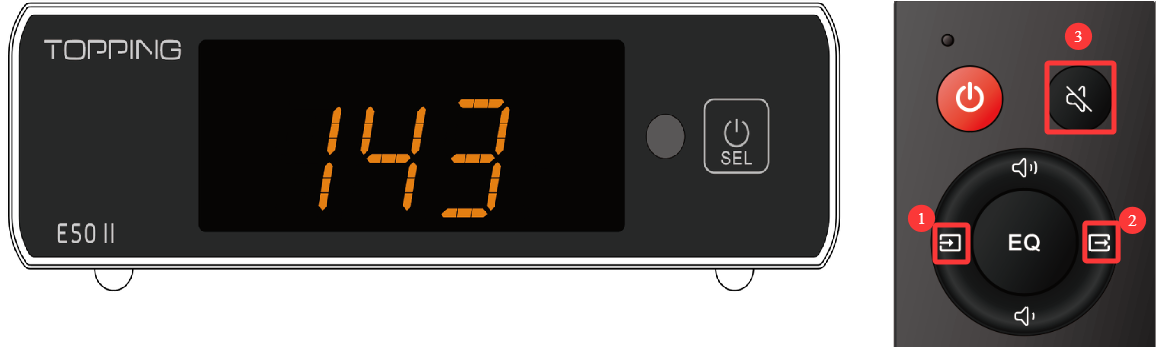
*The picture is only for reference.
3. Download
Windows: Download here (This update requires a Windows 10 or higher OS with driver installed. Drivers could be downloaded here)
MAC: Download here
4. How to update the firmware
1. Connect the USB cable to your computer, and the other end to the USB-C port of your E50 II.
2. Locate the firmware upgrade installation package we downloaded, extract it, and run the .exe application in the folder.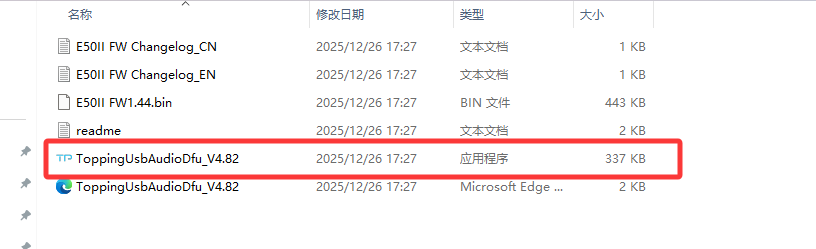
3. Click Browse... and select the E50 II FW1.46.bin file in the folder.
4. Click Start, wait a few seconds (Please do not interrupt the device during the update process).
5. After the message "Firmware upgrade finished successfully." appears, wait for the device to display 8-8 to complete the upgrade. Then click "Exit".
5. Problems may be encountered
If the computer does not recognize the unit, try using another USB port, another USB cable or even another computer.
When power supply is insufficient, first connect DC 5V to the POWER port, then connect the computer to the USB-C port, and then follow the update steps to update.
6. What's updated


